
Know who's where, and what it cost.
Appointments live on the job they belong to. Crews clock in to a specific job with one tap, and the hours roll straight into timesheets and job costs.
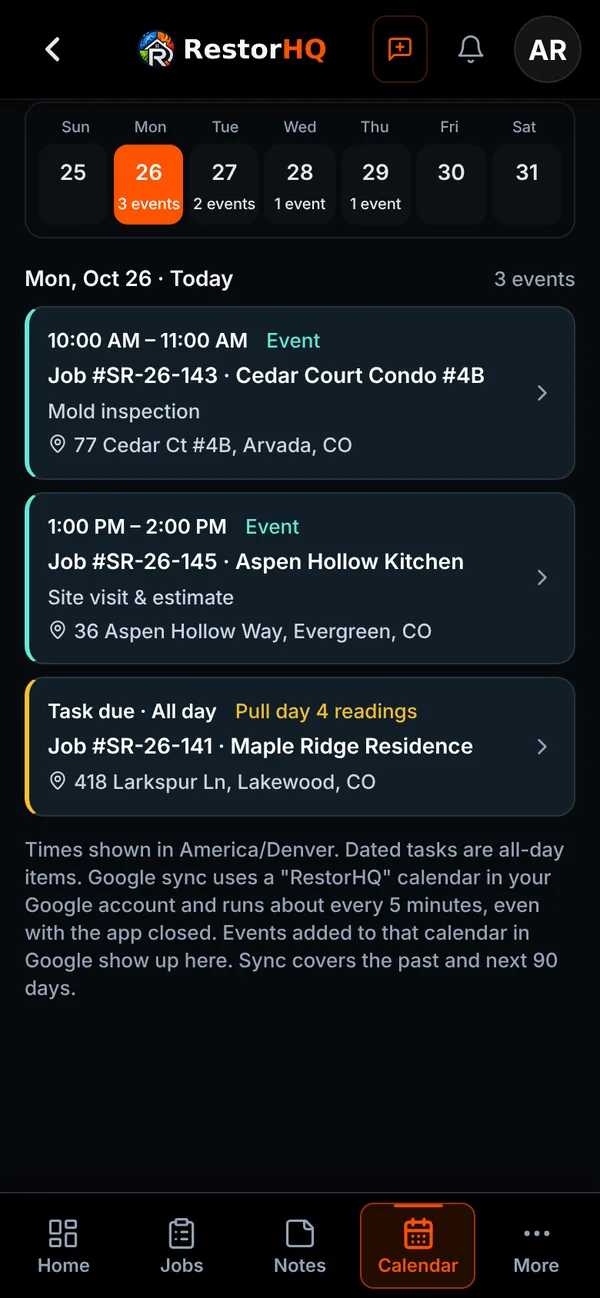
A calendar tied to the job
Agenda, week, and month views for appointments and crew events.
- Every appointment and event is linked to its job, with a searchable job picker
- Two-way Google Calendar sync with a dedicated RestorHQ calendar
- Dated tasks assigned to you show up on your Google Calendar too
- An optional shared team calendar with everyone's appointments
- Dated follow-ups straight from timeline notes and estimates
Time clock and timesheets
Accurate hours without chasing paper.
One-tap job clock
Clock in to a specific job from anywhere in the app. Closed or lost jobs can't be clocked into.
Works on weak signal
Punches are kept on the phone when there's no signal and sync when you reconnect.
Live crew clocks
See who's on the clock on each job and in timesheets.
Timesheets
Admins can add entries for staff, add temp workers who don't have an app account, and mark whether each entry is billed to the customer.
Excel export
Export timesheets to Excel for payroll.
Friday owner report
A weekly overview for owners, including close rates for each estimator.
See it on your next job.
RestorHQ is in private beta. We're onboarding restoration companies in small batches.